
Software as a Service (SaaS) is a cloud-based software delivery model in which users access applications through the internet instead of installing them on local devices or servers. Under this model, software providers host, maintain, and update applications, while customers typically pay subscription fees to use the service.
The SaaS model has become a widely used approach across industries because it allows organizations to access software through web browsers and mobile applications. Businesses use SaaS solutions for customer relationship management, accounting, project management, communication, human resources, marketing automation, and many other functions.
| Advantages | Disadvantages |
| Lower initial investment | Recurring subscription costs |
| Fast deployment | Dependence on internet connectivity |
| Easy scalability | Vendor lock-in concerns |
| Automatic updates | Limited customization in some solutions |
| Remote accessibility | Service downtime risks |
| Reduced hardware requirements | Data security concerns |
| Simplified maintenance | Data migration challenges |
| Predictable operating expenses | Compliance requirements |
| Easier collaboration | Less control over infrastructure |
| Global access | Long-term costs may increase over time |
What is the SaaS Business Model?
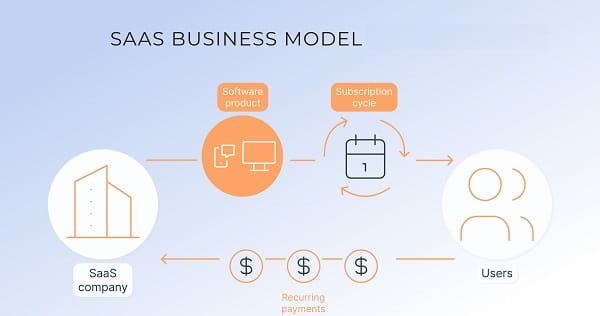
The SaaS business model delivers software applications through cloud infrastructure. Users access the software through an internet connection, while the service provider manages servers, updates, security measures, and maintenance activities.
Unlike traditional software models that require one-time license purchases and local installation, SaaS solutions generally operate through subscription-based pricing structures.
Common Characteristics of SaaS
- Cloud-based delivery
- Subscription pricing
- Automatic software updates
- Web-based access
- Centralized data storage
- Multi-user accessibility
- Provider-managed infrastructure
How the SaaS Business Model Works
The SaaS model involves three primary components:
1. Software Provider
The provider develops and manages the application. Responsibilities typically include:
- Hosting infrastructure
- Security management
- Software maintenance
- Feature updates
- Customer support
2. Cloud Infrastructure
Applications operate on remote servers rather than customer-owned hardware. Cloud infrastructure enables users to access services through internet-connected devices.
3. End Users
Customers subscribe to the software and access it through browsers, desktop applications, or mobile applications.
Common Pricing Structures
SaaS providers often use:
- Monthly subscriptions
- Annual subscriptions
- Per-user pricing
- Usage-based pricing
- Tiered pricing plans
- Enterprise agreements
Advantages of the SaaS Business Model
1. Lower Initial Costs
Traditional software implementations often involve expenses related to licenses, hardware, installation, and infrastructure.
The SaaS model generally reduces upfront expenditures because customers pay subscription fees instead of purchasing software outright.
2. Faster Deployment
SaaS applications are usually available immediately after account setup.
Benefits of rapid deployment include:
- Shorter implementation timelines
- Faster onboarding
- Quicker access to software features
3. Scalability
Organizations can increase or decrease software usage according to operational requirements.
Scalability options commonly include:
- Additional user accounts
- Increased storage capacity
- Expanded feature access
- Higher service tiers
4. Automatic Updates
Software providers manage updates centrally.
These updates may include:
- Security improvements
- Bug fixes
- Performance enhancements
- New features
Users typically access updated versions without manual installations.
5. Accessibility
SaaS applications can be accessed through internet-connected devices.
Accessibility features include:
- Remote access
- Mobile compatibility
- Browser-based usage
- Cross-device functionality
6. Reduced IT Infrastructure Requirements
Organizations generally require fewer on-premise servers and hardware resources when using SaaS applications.
This may reduce requirements related to:
- Server procurement
- Hardware maintenance
- Infrastructure upgrades
- Data center management
7. Easier Collaboration
Many SaaS platforms support real-time collaboration among users.
Common collaboration features include:
- Shared workspaces
- Team dashboards
- Simultaneous editing
- Centralized data access
8. Predictable Operating Expenses
Subscription pricing often creates recurring and predictable software expenses.
Organizations can allocate budgets based on:
- Monthly subscription fees
- Annual contracts
- Usage-based charges
Disadvantages of the SaaS Business Model
1. Recurring Subscription Costs
Although SaaS reduces initial investment requirements, subscription payments continue throughout the usage period.
Costs may increase due to:
- Additional users
- Premium features
- Storage upgrades
- Expanded service plans
2. Dependence on Internet Connectivity
Most SaaS applications require internet access.
Potential challenges include:
- Connectivity disruptions
- Network outages
- Limited access in low-connectivity regions
Application availability may depend on network performance.
3. Vendor Lock-In
Organizations may encounter challenges when changing SaaS providers.
Factors associated with vendor lock-in include:
- Data migration complexity
- Integration dependencies
- Workflow adjustments
- Contractual obligations
4. Data Security Concerns
Customer data is stored on provider-managed infrastructure.
Security considerations may involve:
- Data breaches
- Unauthorized access
- Third-party risks
- Cybersecurity threats
Security measures vary among providers.
5. Limited Customization
Some SaaS platforms provide standardized features designed for broad user groups.
Limitations may include:
- Restricted software modifications
- Limited workflow customization
- Feature constraints
- Platform-specific configurations
6. Service Downtime
Cloud-based services may experience temporary interruptions.
Potential causes include:
- Server maintenance
- Infrastructure failures
- Network disruptions
- Technical issues
During outages, users may experience reduced access to services.
7. Compliance Requirements
Certain industries operate under regulatory frameworks governing data storage and management.
Examples include:
- Healthcare regulations
- Financial compliance standards
- Government data policies
- Industry-specific requirements
Organizations may need to verify compliance capabilities before adopting SaaS solutions.
8. Data Migration Challenges
Moving data between platforms can require significant planning.
Migration activities may involve:
- Data conversion
- System integration
- Validation processes
- User training
Migration complexity often depends on data volume and system architecture.
9. Reduced Infrastructure Control
Since providers manage hosting environments, customers generally have less direct control over:
- Server configurations
- Maintenance schedules
- Infrastructure changes
- Update timelines
10. Long-Term Cost Considerations
Subscription expenses accumulate over extended periods.
Long-term costs may vary based on:
- Number of users
- Contract duration
- Feature requirements
- Pricing adjustments
Key SaaS Business Metrics
SaaS companies commonly track performance through several operational metrics.
Monthly Recurring Revenue (MRR)
MRR represents subscription revenue generated during a month.
Annual Recurring Revenue (ARR)
ARR measures recurring subscription revenue over a twelve-month period.
Customer Acquisition Cost (CAC)
CAC refers to the cost associated with acquiring new customers.
Customer Lifetime Value (CLV)
CLV estimates revenue generated from a customer throughout the business relationship.
Churn Rate
Churn rate measures the percentage of customers who discontinue subscriptions during a specific period.
Net Revenue Retention (NRR)
NRR tracks revenue growth or decline from existing customers.
Common Applications of SaaS
SaaS solutions support various business functions, including:
- Customer relationship management (CRM)
- Human resource management
- Project management
- Accounting and finance
- Marketing automation
- Customer support
- Communication and collaboration
- Enterprise resource planning (ERP)
- Data analytics
- E-commerce management
Conclusion
The SaaS business model is a cloud-based software delivery approach that provides applications through subscription-based access. Its commonly cited advantages include lower initial costs, scalability, accessibility, automatic updates, and reduced infrastructure requirements. Commonly discussed disadvantages include recurring subscription expenses, internet dependency, vendor lock-in, security considerations, and compliance requirements. The model is widely used across industries for delivering software applications through cloud infrastructure.
FAQs
Q: What does SaaS stand for?
A: SaaS stands for Software as a Service, a cloud-based software delivery model that provides access to applications through the internet.
Q: How is SaaS different from traditional software?
A: Traditional software often requires installation on local systems, whereas SaaS applications are hosted by providers and accessed online.
Q: What are the main advantages of SaaS?
A: Common advantages include lower initial costs, scalability, automatic updates, remote accessibility, and reduced infrastructure requirements.
Q: What are the main disadvantages of SaaS?
A: Common disadvantages include recurring subscription fees, internet dependency, vendor lock-in, service downtime risks, and data security considerations.
Q: Is SaaS only used by large businesses?
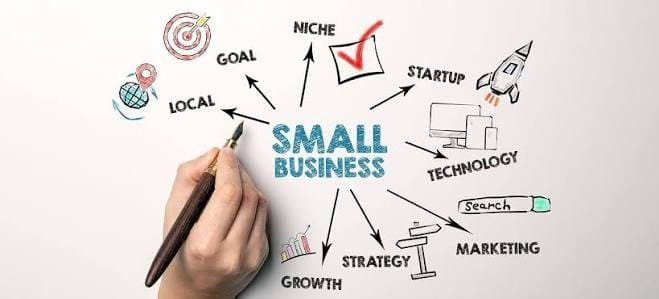
A: No. SaaS solutions are used by startups, small businesses, medium-sized organizations, and large enterprises.
Q: Does SaaS require installation?
A: Many SaaS applications operate through web browsers and require minimal or no local installation.
Q: How do SaaS providers generate revenue?
A: Revenue is commonly generated through subscription fees, usage-based pricing, enterprise plans, and premium service tiers.
Q: Can SaaS applications work on mobile devices?
A: Many SaaS platforms provide mobile applications or mobile-compatible web interfaces.
Q: What industries use SaaS solutions?
A: Industries including healthcare, finance, retail, education, manufacturing, technology, and professional services use SaaS applications.
Q: What is multi-tenant architecture in SaaS?
A: Multi-tenant architecture allows multiple customers to use the same software infrastructure while maintaining separate and secure data environments.









Leave a Reply